HTMLImageElement: x property
Baseline
Widely available
This feature is well established and works across many devices and browser versions. It’s been available across browsers since July 2015.
The read-only x property of the HTMLImageElement interface indicates the x-coordinate of the <img> element's left border edge relative to the root element's origin.
Value
An integer value indicating the distance in pixels from the left edge of the element's nearest root element to the left edge of the <img> element's border box. The nearest root element is the outermost <html> element that contains the image. If the image is in an <iframe>, its x is relative to that frame.
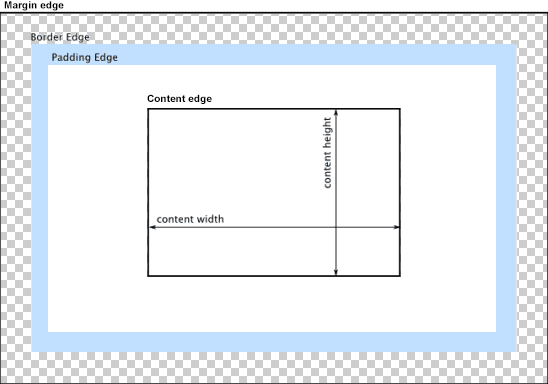
In the diagram below, the left border edge is the left edge of the blue padding area. So the value returned by x would be the distance from that point to the left edge of the content area.
Examples
The example below demonstrates the use of the HTMLImageElement properties x and y.
HTML
<img id="avatar" src="/shared-assets/images/examples/grapefruit-slice.jpg" />
<pre id="log"></pre>
JavaScript
The JavaScript code that fetches the image and looks up its x and y values is below.
const logBox = document.querySelector("pre");

const log = (msg) => {
  logBox.innerText += `${msg}\n`;
};

const image = document.getElementById("avatar");

log(`Image's global X: ${image.x}`);
log(`Image's global Y: ${image.y}`);
Finally, we can look up and display the values of the HTMLImageElement's x and y properties.
CSS
The CSS defining the image size and its position:
img {
  margin-left: 30px;
  margin-top: 20px;
  max-width: 4em;
}
Result
The resulting image looks like this:
Specifications
| Specification |
|---|
| CSSOM View Module # dom-htmlimageelement-x |